Welcome to the Sonetho! ⚡
📌 Looking for the latest head-to-head numbers? See our Eleven v3 vs v2 Korean voice test (4 parts).
In our last post, we discussed the power of ElevenLabs, but let’s be honest—you’ve likely hit a wall while experimenting yourself. You might be asking, "Why doesn't this sound like my reference clip?" or "Why does it keep clipping the end of my sentences?"
Having burned through millions of characters over the past year, I’m here to share my real-world "pro tips." These aren't just generic manual snippets—they’re hard-earned insights from weeks of trial and error. Read on to sharpen your workflow!
👉 The Bottom Line: For most content, Eleven Multilingual v2 remains the gold standard for stability. To leverage Professional Voice Cloning (PVC), you’ll need the Creator plan or higher. You can get started with start free — no credit card (then 50% off your first month) (effectively $11/mo).
1. Choosing Your Model: Newer Isn't Always Better
Many users assume, "v2.5 or v3 are the latest, so they must be the best, right?" Not exactly.
① Eleven Turbo v2.5 (The Efficiency King)
- Pros: Extremely fast output and 50% cheaper on your character quota.
- Cons: Let’s be real—it’s not for high-fidelity needs. It struggles to capture the nuance and specific inflections of a custom PVC voice, often sounding a bit "flat."
- Verdict: Perfect for simple readings, prototyping, or AI Agents where latency is critical. But for expressive, emotive acting? Skip it.
② Eleven Multilingual v2 (Our Top Pick ⭐)
Don't just take my word for it. Run the exact same sentence through v2.5 and Multilingual v2. Use your free credits to compare them, and you’ll instantly understand why v2 is worth the extra character cost for superior tone and inflection.
🎙️ Try v2 with Text to Speech →- Features: This is my personal daily driver.
- Why: It perfectly captures the nuance and "soul" of a PVC voice. While it costs more than Turbo v2.5, the quality is undeniably superior. If you want a voice that sounds human, this is the one.
③ Eleven v3 (GA since Feb 2026)
- Features: The emotional range is incredible—it’s comparable to a professional voice actor.
- The Catch: While the expression is top-tier, it can be less consistent than v2 for long-form content.
- In long scripts, you might notice the vocal tone shifting between paragraphs.
- Common issue: The very last word or syllable of a sentence can sometimes get clipped.
- Verdict: Use it for short clips where you need high drama. For long-form documents, stick to v2.
2. Setting Values: The Golden Ratio
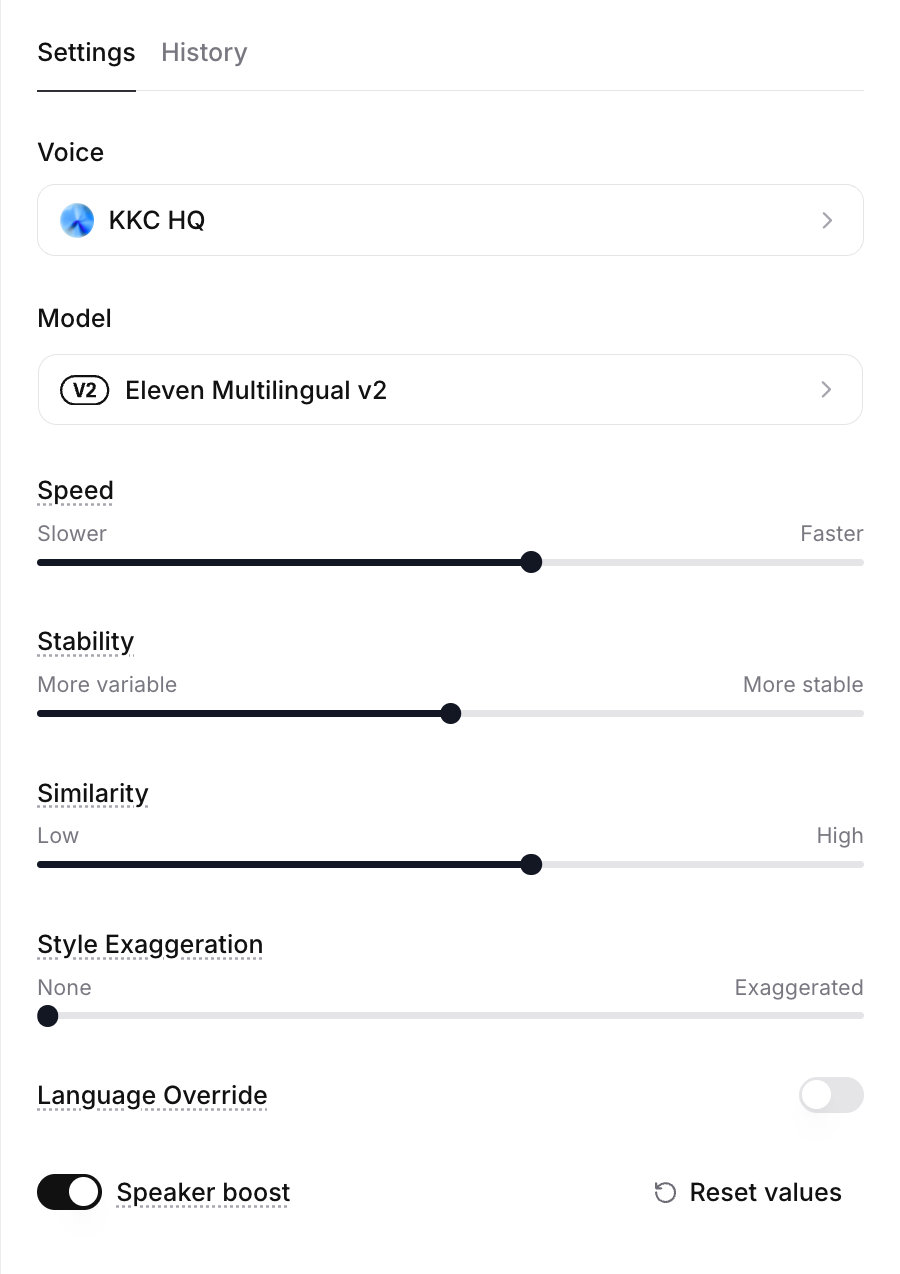
The 'Settings' that determine your output quality
① Stability
- General Rule: High = Robotic/Monotone; Low = Human/Expressive.
- Pro Tip: I usually keep it low (40%–60%). If your output sounds "wonky" or mispronounces words, dial it down further.
- If the AI keeps tripping over a specific word, dropping stability to 30%–40% gives the model enough "flexibility" to recover. For long scripts, lower stability helps maintain a natural, conversational flow.
② Similarity (Clarity)
- Recommended Value: 60% (Fixed).
- Why: Pushing this too high (80%+) forces the model to over-index on raw data, resulting in stiff, unnatural delivery. 60% is the sweet spot for maintaining voice identity while allowing for a dynamic performance.
③ Style Exaggeration
- Baseline: 0% (usually works best).
- Exception: For short sentences with exclamation marks (!), questions (?), or interjections, try 1%–10%. Even a 1% boost changes the emotional weight significantly.
- Tip: Increase this if you want your clone's distinct mannerisms to really pop.
3. Beyond Periods and Commas: The Power of the 'Hyphen (-)'
This is the secret sauce of today's post. Ever notice the AI stumbling over numbers or compound words?
Scenario: Trying to read "fifty-seven" but it sounds like "fift-yseven" or the pacing feels off.
Solution: Instead of a comma, which creates an awkward, long pause, use a hyphen (-).
- Example: fifty-seven
- Effect: It creates a micro-pause—just enough for the model to articulate clearly without breaking the cadence of speech.
"When a sentence feels unnatural, I swap commas for hyphens to fine-tune the breath."
4. Language Override: Is it worth it?
This is a newer feature, likely added to prevent bugs where the AI reads numbers in the wrong language. However, in my experience, it’s hit-or-miss.
I recommend keeping it on Automatic. If numbers are being mispronounced, spell them out or use the hyphen trick mentioned above. It’s a much more reliable fix.
🤔 "It's still mispronouncing my brand name!"
Proper nouns or specific technical acronyms (like NASA or CEO) won't always be fixed by slider settings. Use the 'Pronunciation Dictionary' to force the AI to get it right every time.
👉 [Guide] How to Force Pronunciation Correctly (Click Here)🎁 Final Thoughts
ElevenLabs is all about how you "direct" the AI. Once you get the hang of these nuances, the quality is truly unrivaled.
Still on the free tier? You’re missing out on the full potential of Voice Cloning (PVC). Grab the 50% off Creator plan while the promo is live and test out these tips for yourself.
(Redirects to the official discount page)
❓ Frequently Asked Questions (FAQ)
Q1. Which model should I use for Korean?
A. Eleven Multilingual v2 is the most reliable choice for general content creation.
It captures the tone and nuances of cloned voices most effectively.
Turbo v2.5 is faster and more affordable, but it often sounds flat and fails to retain the distinct tone and intonation of PVC.
Turbo v2.5 is acceptable for use cases where speed is critical, such as AI phone support.
Q2. Why don't you recommend v3, even though it is the latest version?
A. v3 offers the best emotional expression.
However, tone consistency is less stable than v2 when processing longer content.
It often causes the voice to shift between paragraphs or results in the last character of a sentence being cut off abruptly.
Use it only when short, highly expressive sentences are required, and avoid it for long documents.
Q3. What is the recommended setting for Stability?
A. I usually recommend a lower setting between 40% and 60%.
The general rule is that higher settings sound more robotic, while lower settings sound more human.
If the AI consistently clips or garbles specific words, try lowering it significantly to the 30% to 40% range.
This adds flexibility that often fixes pronunciation errors, and lower settings lead to more natural tone and intonation in long scripts.
Q4. Doesn't increasing Similarity make the voice sound more accurate?
A. Setting it above 80% makes the model overly focused on the training data, resulting in stiff intonation.
Setting it around 60% is the "sweet spot" for maintaining voice tone while allowing for natural delivery.
For Korean, it is best to keep Style Exaggeration at 0%, only increasing it to 1% to 10% for short sentences containing exclamation marks or question marks.
Q5. The model reads numbers strangely.
A. Try using a hyphen instead of a comma.
For example, if it bunches words together like "fifty-seven," write it as "fifty-hyphen-seven."
Commas cause awkward, long pauses, but a hyphen creates a tiny break that ensures accurate pronunciation without breaking the flow of the breath.
Q6. Can I just fix the language using Language Override?
A. In my experience, this is often ineffective.
It is better to leave it on Automatic and spell out numbers or use hyphens if they are read incorrectly.
If proper nouns, such as brand names or English acronyms, are the issue, you should register them in the Pronunciation Dictionary rather than relying on global settings.
In our next post, we’ll cover "ElevenLabs: Creating Your Own AI Voice (Voice Cloning Guide)" with even more expert secrets.
Sonetho⚡