"I love the tone of this Voice Design voice, but..."
Have you ever generated a custom voice only to find its pronunciation a bit off or unnatural
when reading specific terms, homographs, or acronyms?
Today, Sonetho reveals a clever "Speech-to-Speech" hack
to give your unique custom voice flawless pronunciation
and highly natural performance.
"It's time to upgrade from those overused stock voices!"
Hello! Welcome to Sonetho. ⚡
ElevenLabs features an incredible tool called 'Voice Design'.
Think of it as an 'AI voice gacha'—it rolls a completely unique, randomized voice based on your chosen gender, age, and accent.
But it has one critical limitation: these generated voices can sometimes struggle with complex pronunciations and subtle nuances.
That’s why we’ve put together this guide. Here is our fail-proof strategy to bypass Voice Design’s pronunciation limits using pure technique.
1. What is Voice Design? (AI Voice Gacha)
Simply put, it’s a tool for "creating a voice that doesn't exist anywhere else in the world."
No audio recordings needed. With a single click, the AI spins up a completely original voice. It’s the perfect way to secure a unique brand voice without worrying about licensing, copyrights, or publicity rights.
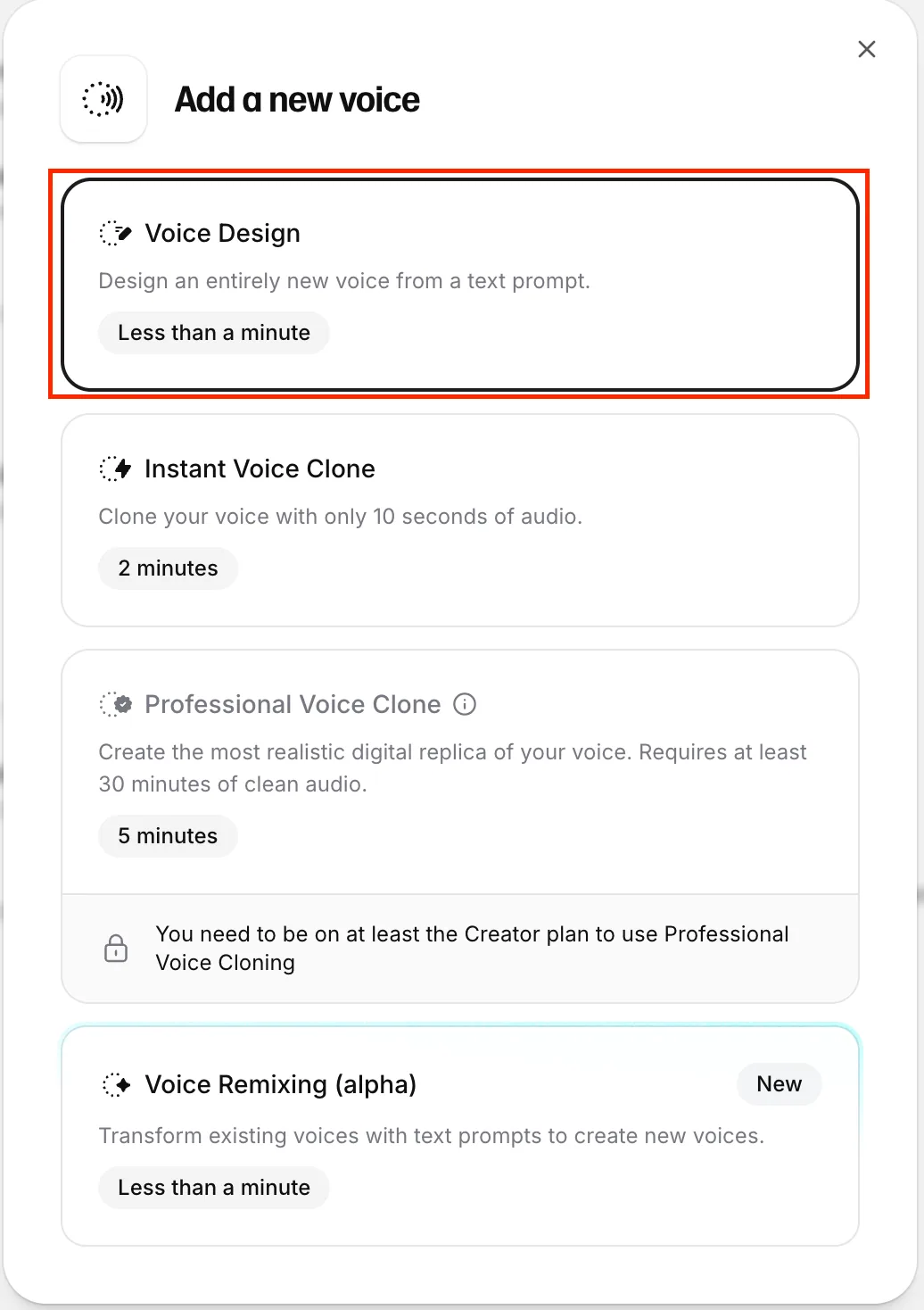
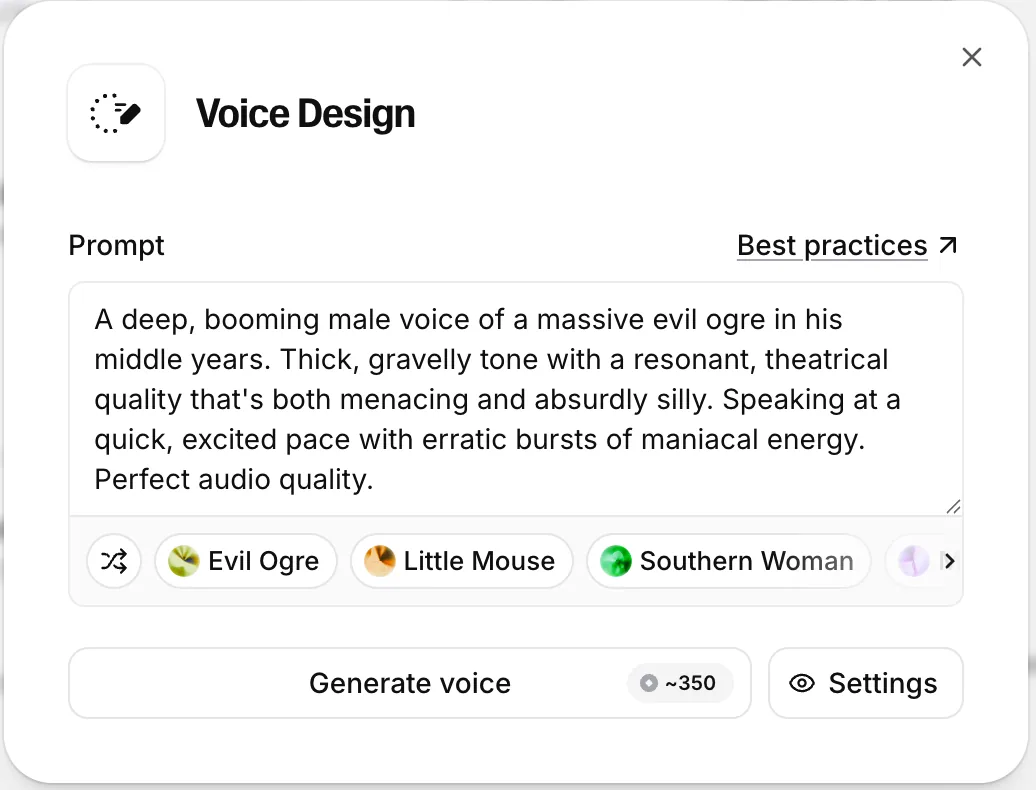
▲ Enter gender, age, and accent, then click "Generate Voice" to bring a brand-new character to life.
💡 Pro Tips from the ElevenLabs Official Guide
- Prompt Input: Instead of generic adjectives, use highly descriptive prompts like "An elderly British gentleman with a warm, raspy voice" to nail a specific tone.
- Magic Keywords: Adding descriptive phrases like "crisp studio recording" or "ultra-clean audio quality" to your prompt significantly boosts the output fidelity.
🚨 Caution: "Don't get fooled by the preview player!"
The three preview samples generated inside Voice Design are rendered with premium, optimized settings.
However, when you actually save the voice and generate your script, the system might default to an older model (like Eleven Multilingual v2). This can result in a flat, robotic delivery that struggles with natural pacing and rhythm...
✅ The Fix: Upgrade the Model!
- Check your active Model settings in the Speech Synthesis panel.
- Be sure to select Eleven Multilingual v2 (or Eleven Flash v2.5 for lightning-fast turnarounds) to unlock true emotional depth and natural, realistic delivery.
- Pro Tip: Lowering the Stability slider slightly will yield a much richer, more expressive performance.
2. The Reality: "Even with v3, some words still trip up..."
Upgrading to v3 and tweaking the Stability settings works wonders for the emotional tone.
But there are still those stubborn pronunciation hiccups that can drive you crazy.
Even advanced models can occasionally stumble over English homographs (e.g., a cold wind vs. to wind a watch; read a book yesterday vs. read it now; a bow in her hair vs. to bow to the audience). Acronyms can also be a headache—like spelling out 'NASA' letter-by-letter, or awkward phonetic slips on terms like 'CEO', symbols like '$', time formats like 'AM/PM', or loanwords like 'déjà vu'. The result? Awkward pauses and broken phrasing. (Incredibly frustrating! 😫)
3. The Fusion Hack: How to Fix This 100% Using Speech-to-Speech
"I absolutely love the tone of this voice, but the pronunciation issues make it unusable..."
If you've hit this wall, your ultimate secret weapon is a clever fusion technique using ElevenLabs' Speech-to-Speech (STS) tool.
🛠️ The Core Principle: A Division of Labor
- Voice Design: Handles the 'Voice Timbre' (The Shell / Visual Look).
- Speech-to-Speech: Directs the 'Pronunciation, Pacing, and Performance' (The Soul / Acting).
STEP 1. Record or Generate Your 'Guide Audio'
First, record or generate a guide track using a voice that reads your script flawlessly. You can use your own voice or a highly reliable Professional Voice Clone (PVC). This guarantees that tricky acronyms, homographs, and pacing are captured with absolute accuracy.
STEP 2. Run the Fusion (Speech-to-Speech)
- Voice Settings: Choose the unique custom character you generated via Voice Design.
- Audio Upload: Upload the flawless 'Guide Audio' file you just recorded.
- Generate: Click generate, and watch the magic happen!
💸 A Quick Note on Credit Usage
Since this method involves generating a guide track and then performing the conversion, it effectively uses twice the credits...
However, if you are building a premium, highly polished signature voice for your brand, it is an incredibly smart investment—especially when you have plenty of monthly credits on the Creator ($22/mo) or Pro ($99/mo) plans.
Wrapping Up: An AI Tool is Only as Good as Its Creator
While Voice Design can occasionally trip over tricky English terms,
marrying it with Speech-to-Speech unlocks a highly polished, completely unique 'signature voice' that belongs entirely to your brand.
With the ElevenLabs Creator Plan currently 50% off (making it just $11 for your first month), now is the perfect time to grab some credits and start building your custom voice library.
(Signing up via the link above applies a 50% discount to your first month.)
For business inquiries or collaborations, feel free to reach out to us at [email protected]!
Thanks for reading, and we'll see you in the next guide! — Sonetho. ⚡